The Y-Wing (also called "XY-Wing") is a powerful advanced technique that uses three bi-value cells arranged in a specific pattern to eliminate candidates. It's one of the most satisfying patterns to spot!
Quick Summary
What: Three cells with candidates AB, AC, and BC forming a pivot pattern
Shape: One pivot cell "sees" two wing cells (wings don't see each other)
Result: Eliminate the common candidate (C) from cells that see both wings
The pattern gets its name from the Y-shape formed when you draw lines from the pivot to each wing.
🎯
Pivot
Candidates: A, B
Sees both wings
🪽
Wing 1
Candidates: A, C
Sees pivot only
🪽
Wing 2
Candidates: B, C
Sees pivot only
How to Find Y-Wings
1
Find bi-value cells
Scan the grid for cells containing exactly two candidates. These are your potential pivot and wing cells.
2
Pick a potential pivot
Choose a bi-value cell with candidates A and B. This will be your pivot.
3
Find Wing 1
Look for a bi-value cell that sees the pivot and shares one candidate (A) plus a different candidate (C). This cell has candidates A and C.
4
Find Wing 2
Look for a bi-value cell that sees the pivot and has candidates B and C. It must share B with the pivot and C with Wing 1.
5
Verify wings don't see each other
The two wings must NOT be in the same row, column, or box. If they see each other, the pattern doesn't work.
6
Find elimination targets
Any cell that sees BOTH wings can have candidate C eliminated.
Practical Example
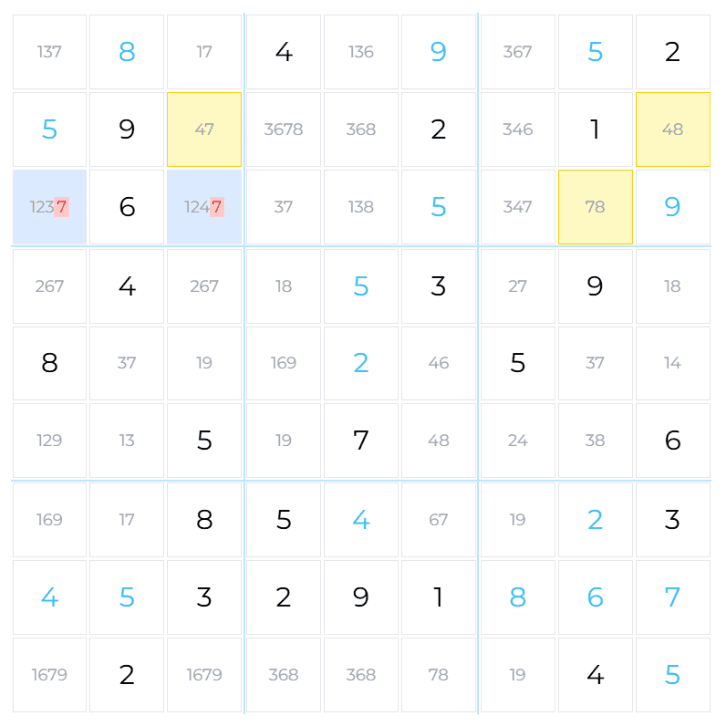
Y-Wing on Candidates 4, 7, 8
In this example, we have a Y-Wing with:
Pivot at R2C9: Candidates 4, 8
Wing 1 at R2C3: Candidates 4, 7 (sees pivot via row 2)
Wing 2 at R3C8: Candidates 7, 8 (sees pivot via box 3)
The wings share candidate 7 but the pivot doesn't have 7.
Logic: The pivot must be either 4 or 8. If it's 4, Wing 1 becomes 7. If it's 8, Wing 2 becomes 7. Either way, one wing is definitely 7!
Elimination
Eliminate 7 from any cell that sees both R2C3 and R3C8.
Why It Works
The logic is elegant. Consider the pivot cell with candidates 4 and 8:
If Pivot = 4: Wing 1 (which has 4, 7) must become 7, since 4 is taken.
If Pivot = 8: Wing 2 (which has 7, 8) must become 7, since 8 is taken.
In both cases, at least one wing becomes 7. Since any cell that sees both wings would "see" a 7 regardless of which scenario plays out, we can eliminate 7 from those cells.
Visual representation:
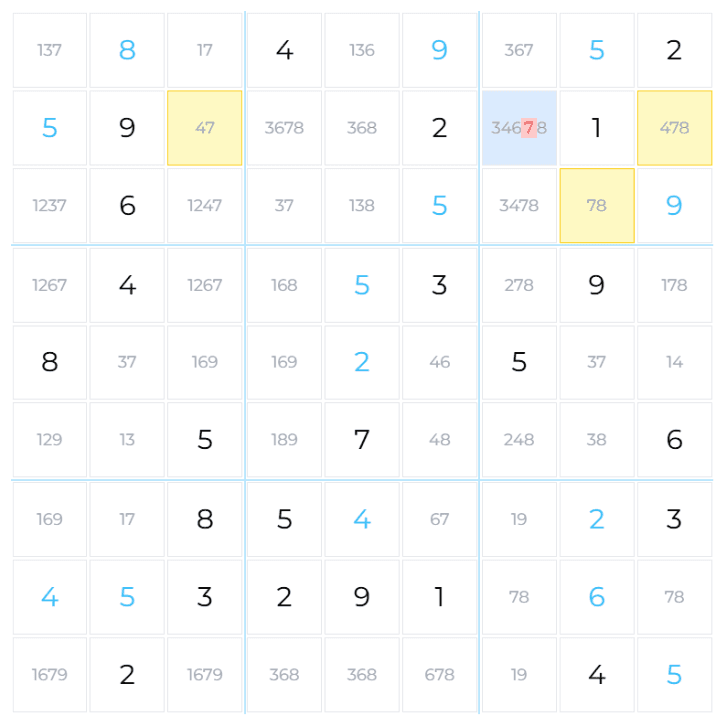
Same corner layout in a real example: pivot and two wings force the bottom-right target elimination.
The Either/Or Logic
We don't need to know which wing contains 7 — we just know one of them definitely does. This is enough to eliminate 7 from any cell that sees both wings.
Detection Tips
Start with Rare Bi-Value Pairs
Focus on candidate pairs that appear in few bi-value cells. If candidates 4 and 8 only appear together in 3 cells, checking those for Y-Wing patterns is quick.
Look for the Common Candidate
Instead of finding the pivot first, look for the common wing candidate (C). Find all bi-value cells containing C, then check if any pair could be wings with a connecting pivot.
Draw Mental Lines
When you find a potential pivot, mentally draw lines to cells it sees. Look for bi-value cells along those lines that could form wings.
Wings Must Not See Each Other
A common mistake is connecting wings that share a row, column, or box. For the elimination to work, the wings must be in separate units (only connected through the pivot).
Related Techniques
Y-Wing is part of the "Wing" family of techniques, all using bi-value cells to create elimination patterns:

 Advanced